 Raid-Calender
The in-game addon
The Raid-Calender addon brings the raid from the website into World of Warcraft: it invites everyone signed up, sorts the groups, shows soft reserves when loot drops and checks food and flasks at ready checks. It also notes who was there for each boss and who got what, and you paste that log into the website. Only the raid leader needs it.
Download the addon (v1.12.2)Get it on CurseForgeGet it on WagoFor retail (Midnight) and Classic Era.
Install
Easiest is an addon manager: install Raid-Calender from CurseForge or Wago with their app, which keeps it up to date. By hand:
- Download the zip above.
- Unpack it into
World of Warcraft\_retail_\Interface\AddOns(Classic Era:_classic_era_instead of_retail_). There should now be a folderAddOns\RaidCalender. - Restart the game and check that Raid-Calender is ticked under AddOns at character select.
To update, replace the RaidCalender folder with the new one. The website tells you on the raid's page when the log you paste came from an older version.
A raid night
- On the website: open the raid and click Copy raid for the addon under In-game addon.
- In the game: type
/rc import, paste with Ctrl+V and press Import. - Press Invite everyone, then Sort groups once everyone is in — the groups follow the website's group builder. With Keep inviting until everyone is in and Seat latecomers in their group on, the addon looks after latecomers itself.
- During the raid the addon logs on its own: who was there for each boss, epic loot, and who lacked food or a flask at ready checks. In Classic it also looks at the gear of everyone in range, out of combat, for the character sheet in the history; raiders who run the addon too send their own, from anywhere in the raid. It only logs from two hours before to eight hours after the raid's start, so a stale import never collects another evening.
- Afterwards: type
/rc export, copy the text with Ctrl+C and paste it under Back from the game on the raid's page. Attendance and loot then show on the raid and in the history. The export also opens by itself when you leave the raid after a logged boss. For damage, healing and deaths per boss, upload the game's combat log there too — see Combat log.
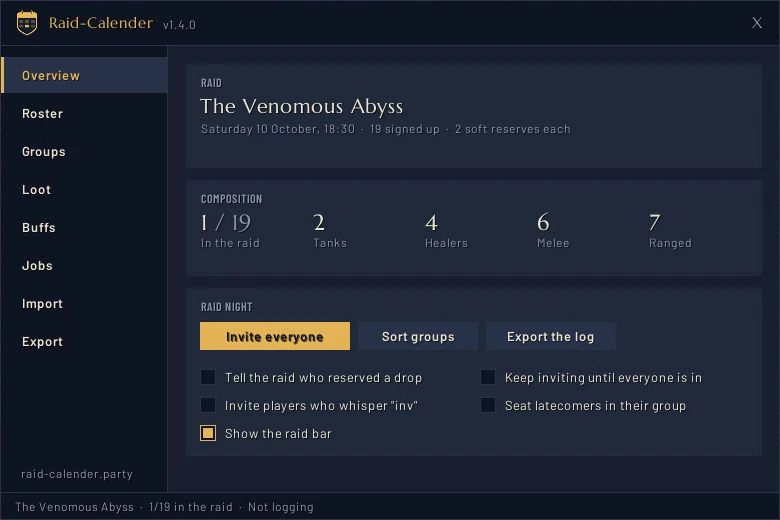
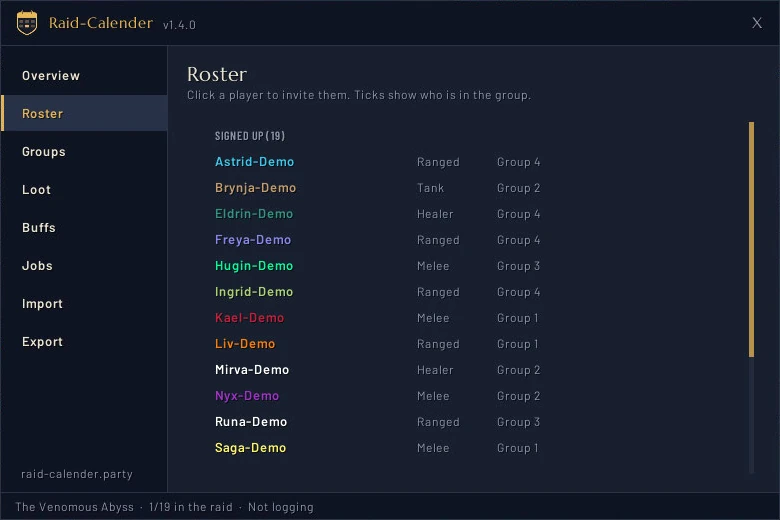
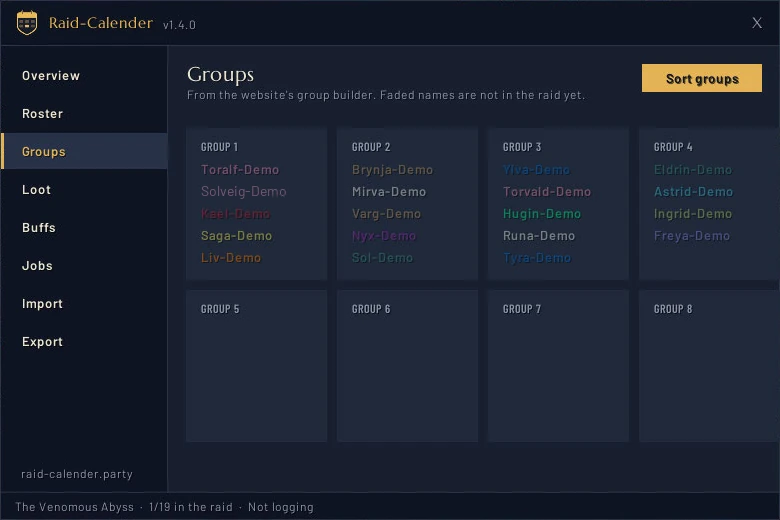
The game cannot reach the internet, so the raid and the log travel by copy and paste. Every raid's log stays in the addon until you delete it on the Export page, so an old log can be exported again.
During the raid
Soft reserves show in item tooltips and when loot drops. When several players reserved the same item, the raid leader gets a window that asks just them to /roll; the addon counts only each player's first 1–100 roll and names the winner. Ties roll again. With SR+ on for the server, each player's bonus is added to their roll, and the window shows it as 71 +20 = 91.
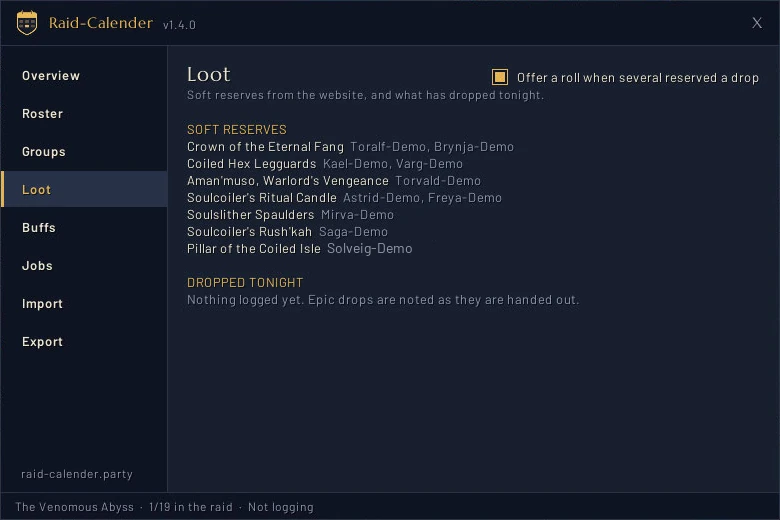
A ready check opens a window with everyone's answer and whether they have food, a flask and (retail) a rune, and a column for each class buff, such as Fortitude and Mark of the Wild. Post missing to raid names who lacks what in raid chat.
Wishlists and RCLootCouncil. When an item drops, the addon names those who soft-reserved it and those who have it on their wishlist. Guilds that use RCLootCouncil get a column in its voting window with each candidate's SR, SR+ bonus and wishlist (W).
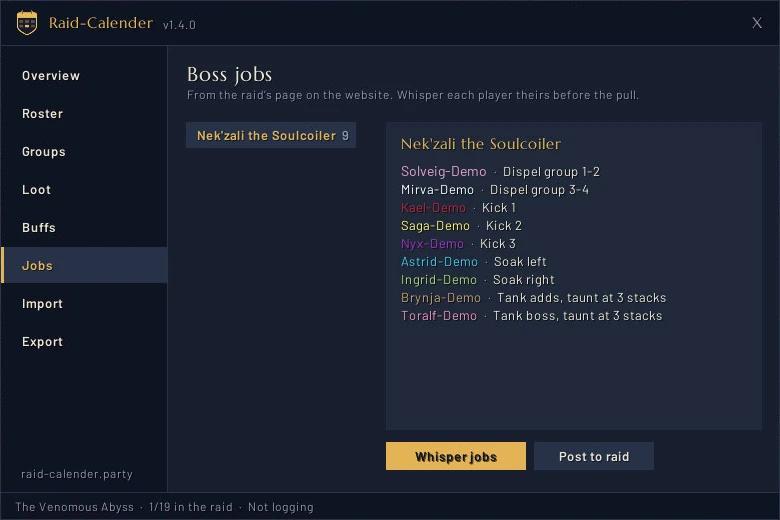
Boss jobs from the website are under Jobs in the window (/rc jobs): pick a boss and press Whisper jobs to whisper each player theirs — those without the addon too — or Post to raid for the whole plan in raid chat. Do it before the pull; the game may hold whispers back during a boss.
Groups per boss. When the website has groups for a boss, pick whose groups to show and sort by in the menu on the Groups page; after a kill the addon turns to the next boss's by itself. Nobody moves until you press Sort groups.
Raid night helpers under Overview: Call the missing (/rc call) whispers signed-up guild members who are online but not in the raid; Give the raid leaders assist promotes the website's raid leaders as they join; and in Classic Era Mark the tanks gives each tank a raid mark once — retail does not let addons set marks. At ready checks, the missing can be told in raid chat or, with Whisper on under Buffs, one whisper each: everyone hears of their own food, flask or rune, and whoever gives a class buff hears who lacks it.
Classic Era also gets a Give button beside the loot window for the master looter, with each reserved item's winner, and raid cooldowns — battle res, Innervate, Shield Wall, Soulstone and more — on a page and in a window of their own (/rc cds) that stays on screen, moves and resizes.
The raid bar (/rc bar) is a small strip to keep on screen: raid marks, world markers (retail), pull and break timers that DBM and BigWigs show, and a ready check. Drag it by the shield.

Good to know
Retail (Midnight) hides some things from addons inside instances. When the addon cannot see someone's buffs it shows a question mark rather than a cross — it never says something is missing when it does not know.
Commands
/rc | open the window |
/rc import | paste the raid from the website |
/rc invite | invite everyone signed up |
/rc sort | move players into their groups |
/rc call | whisper signed-up guild members who are online but not in the raid |
/rc export | the attendance and loot log for the website |
/rc buffs | who lacks food, a flask or a rune |
/rc jobs | the boss jobs from the website |
/rc cds | raid cooldowns: battle res, Innervate, Shield Wall… (Classic Era) |
/rc roll [item] | the players who reserved an item roll for it |
/rc check | the ready-check window, without a ready check |
/rc announce | tell the raid who reserved a drop (on/off) |
/rc bar | show or hide the raid bar |
/rc minimap | show or hide the minimap button |
/rc reset | clear the imported raid's log |
/rc clear | remove the imported raid |